Instructions to use rudranshjoshi/circuit with libraries, inference providers, notebooks, and local apps. Follow these links to get started.
- Libraries
- llama-cpp-python
How to use rudranshjoshi/circuit with llama-cpp-python:
# !pip install llama-cpp-python from llama_cpp import Llama llm = Llama.from_pretrained( repo_id="rudranshjoshi/circuit", filename="circuit.gguf", )
llm.create_chat_completion( messages = "No input example has been defined for this model task." )
- Notebooks
- Google Colab
- Kaggle
- Local Apps
- llama.cpp
How to use rudranshjoshi/circuit with llama.cpp:
Install from brew
brew install llama.cpp # Start a local OpenAI-compatible server with a web UI: llama-server -hf rudranshjoshi/circuit:Q4_K_M # Run inference directly in the terminal: llama-cli -hf rudranshjoshi/circuit:Q4_K_M
Install from WinGet (Windows)
winget install llama.cpp # Start a local OpenAI-compatible server with a web UI: llama-server -hf rudranshjoshi/circuit:Q4_K_M # Run inference directly in the terminal: llama-cli -hf rudranshjoshi/circuit:Q4_K_M
Use pre-built binary
# Download pre-built binary from: # https://github.com/ggerganov/llama.cpp/releases # Start a local OpenAI-compatible server with a web UI: ./llama-server -hf rudranshjoshi/circuit:Q4_K_M # Run inference directly in the terminal: ./llama-cli -hf rudranshjoshi/circuit:Q4_K_M
Build from source code
git clone https://github.com/ggerganov/llama.cpp.git cd llama.cpp cmake -B build cmake --build build -j --target llama-server llama-cli # Start a local OpenAI-compatible server with a web UI: ./build/bin/llama-server -hf rudranshjoshi/circuit:Q4_K_M # Run inference directly in the terminal: ./build/bin/llama-cli -hf rudranshjoshi/circuit:Q4_K_M
Use Docker
docker model run hf.co/rudranshjoshi/circuit:Q4_K_M
- LM Studio
- Jan
- Ollama
How to use rudranshjoshi/circuit with Ollama:
ollama run hf.co/rudranshjoshi/circuit:Q4_K_M
- Unsloth Studio new
How to use rudranshjoshi/circuit with Unsloth Studio:
Install Unsloth Studio (macOS, Linux, WSL)
curl -fsSL https://unsloth.ai/install.sh | sh # Run unsloth studio unsloth studio -H 0.0.0.0 -p 8888 # Then open http://localhost:8888 in your browser # Search for rudranshjoshi/circuit to start chatting
Install Unsloth Studio (Windows)
irm https://unsloth.ai/install.ps1 | iex # Run unsloth studio unsloth studio -H 0.0.0.0 -p 8888 # Then open http://localhost:8888 in your browser # Search for rudranshjoshi/circuit to start chatting
Using HuggingFace Spaces for Unsloth
# No setup required # Open https://huggingface.co/spaces/unsloth/studio in your browser # Search for rudranshjoshi/circuit to start chatting
- Docker Model Runner
How to use rudranshjoshi/circuit with Docker Model Runner:
docker model run hf.co/rudranshjoshi/circuit:Q4_K_M
- Lemonade
How to use rudranshjoshi/circuit with Lemonade:
Pull the model
# Download Lemonade from https://lemonade-server.ai/ lemonade pull rudranshjoshi/circuit:Q4_K_M
Run and chat with the model
lemonade run user.circuit-Q4_K_M
List all available models
lemonade list
Circuit
Fine-tuned Phi-3 for Logical Reasoning

Model performance
Benchmark
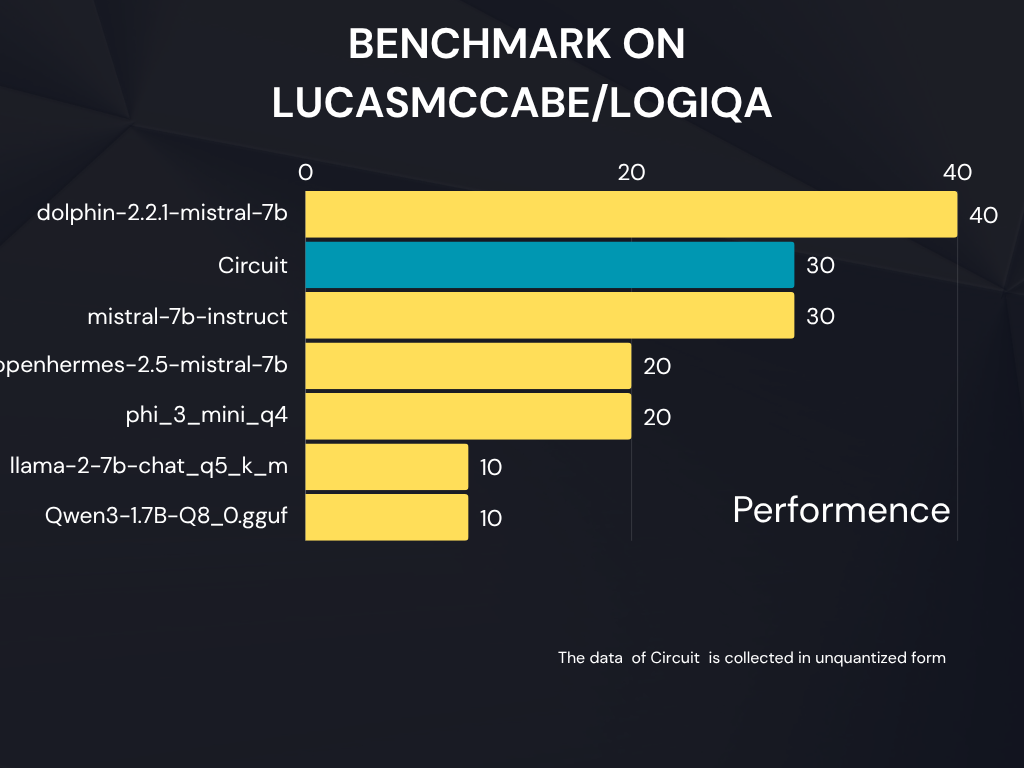
Trained on the lucasmccabe/logiqa dataset, Circuit enhances the model’s ability to reason through complex problems, answer multi-step logic questions, and provide consistent explanations.
Model Details
| Property | Value |
|---|---|
| Base model | microsoft/Phi-3-mini-4k-instruct |
| Fine-tuned for | Logical Reasoning |
| Dataset | lucasmccabe/logiqa |
| Technique | LoRA fine-tuning, merged for direct use |
| Formats available | Full (HF Transformers) + Quantized (.gguf for llama.cpp / Ollama) |
| Project | Circuit |
| Fine-tuned by | Rudransh |
Model Variants
| Variant | Description | File |
|---|---|---|
| Full model | Merged LoRA with base, compatible with transformers |
pytorch_model.bin |
| Quantized model (GGUF) | Optimized for CPU/GPU inference via llama.cpp, text-generation-webui, or Ollama |
circuit_phi3_q4.gguf |
Example Usage (Transformers)
from transformers import AutoModelForCausalLM, AutoTokenizer
import torch
model = AutoModelForCausalLM.from_pretrained(
"rudranshjoshi/circuit",
torch_dtype=torch.float16,
trust_remote_code=True
)
tokenizer = AutoTokenizer.from_pretrained(
"rudranshjoshi/circuit",
trust_remote_code=True
)
device = torch.device("cuda" if torch.cuda.is_available() else "cpu")
model.to(device)
prompt = "Your prompt here"
inputs = tokenizer(prompt, return_tensors="pt").to(device)
outputs = model.generate(**inputs, max_new_tokens=150)
print(tokenizer.decode(outputs[0], skip_special_tokens=True))
Training Summary
Base model: Phi-3 Mini 4K Instruct
Dataset: LogiQA (lucasmccabe/logiqa)
Training method: LoRA fine-tuning, later merged
Hardware: NVIDIA RTX 1080
Epochs: ~3
Objective: Improve reasoning consistency and structured explanations
Acknowledgements
Microsoft for Phi-3
Lucas McCabe for LogiQA dataset
Fine-tuned and quantized by Rudransh under Project Circuit
- Downloads last month
- 19
Model tree for rudranshjoshi/circuit
Base model
microsoft/Phi-3-mini-4k-instruct